✏️ Draft version
This conceptual documentation is being refined over time.
1. Overview
Postman is a tool used to send requests to APIs and explore how services respond. It supports multiple protocols:
- HTTP/HTTPS — Standard protocol for RESTful APIs and web services
- GraphQL — Supports queries and subscriptions
- gRPC — Full support, including native handling of
.protofiles - WebSocket — Real‑time, bidirectional communication
- MQTT — Messaging protocol commonly used in IoT
- SOAP — Traditional protocol for structured data exchange
- MCP — Used to interact with AI models, agents, and servers
2. Purpose
Postman enables users to test, document, and analyze APIs through an intuitive interface.
Before tools like Postman existed, developers had to write custom code to test APIs, which made the process slower and more complex.
3. Business Value
- Test APIs quickly and intuitively
- Improve API quality
- Strengthen API security
4. Key Concepts
| Concept | Description |
|---|---|
| API | The part of an application that receives your request and sends back a response. |
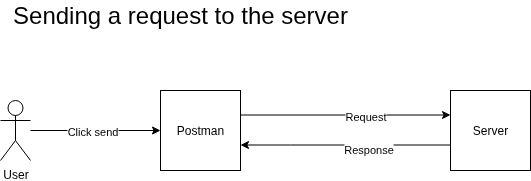
| Request and response model | An API works like a simple exchange: you send a request to a server, and the server replies with a response. Postman lets you build the request and inspect the response. |
| Server | A computer that receives requests and sends back responses. |
| Request | A message sent to a server’s address (URL) asking it to perform an action. |
| Response | The message the server returns in answer to a request. |
| Environment | APIs are often deployed in multiple environments (development, staging, production). Environments in Postman help you test safely and avoid sending requests to production by mistake. |
| Variables | A variable is a box where you store a value that can be reused in your requests. Each environment has its own set of variables, such as the API’s development URL. |
| Collection | A collection groups related requests together. It helps you organize your work and reuse requests as you test an API. |
| Workspace | A workspace groups related collections together. It helps you organize your projects and collaborate with colleagues. |
| Authentication | Verifying your identity before accessing an API. |
| Authorization | Verifying what you are allowed to access after you are authenticated. |
5. Core Features
| Feature | Description |
|---|---|
| Send requests | Postman lets you send requests to an API. |
| Receive responses | You can read and understand the response returned by the API. |
| Organize requests with collections | Create a map of the API’s endpoints to simplify testing and analysis. |
| Team collaboration | Work with teammates in the same workspace. |
| Authentication support | Test APIs protected with authentication. |
| Authorization support | Test endpoints that require specific permissions. |
6. How It Works (Conceptual)
A simplified view of how Postman interacts with an API:
[User] → [Action in Postman] → [Server receives request] → [Server sends response] → [Postman displays response]
7. Typical Use Cases
| Use Case | Description |
|---|---|
| Testing API endpoints during development | Compare the expected response with the actual response. |
| Analyzing API behavior | Send requests to understand how the API behaves. |
| Testing authentication and authorization | Ensure your API is protected and accessible as expected. |
8. Benefits
| Benefit | Description |
|---|---|
| Easier API testing | Frees cognitive energy to focus on improving the API. |
| Faster debugging | Gives you more time to fix issues and improve the API. |
| Less technical knowledge required | Non‑technical users can become proficient quickly. |
| Built‑in documentation | Every request in a collection becomes part of the API’s living documentation. |
| Improved collaboration | Shareable collections let everyone contribute easily. |
| Higher reusability | Collections, environments, and auth setups are saved and reusable. |
9. Limitations
- Requires a minimum understanding of API concepts.
10. Visual Example
11. Glossary
| Term | Definition |
|---|---|
| Cognitive | Related to thinking, understanding, or mental effort. |
| Protocol | A set of rules governing how data is exchanged between devices. |
| Authentication | Verifying the identity of a user, device, or system. |
| Authorization | Determining what resources a user can access after authentication. |
12. Notes
Note: Add any important clarifications here.
13. Revision History
| Version | Date | Author | Changes |
|---|---|---|---|
| 1.0.0 | 2026-05-31 | Marc-André | Initial version |